Turn compliance advice into recurring revenue.
Run PunchGuard™ on each client's punch report before payroll runs, and see the violations while they can still be paid in that pay period. Your firm sees each client's account summary, advises on the premium, and bills for that time. Flat annual license.
One dashboard. Every participating client.
Clients upload their own exports. Each client chooses whether to share results with you and can end access at any time. You see violations, missing punches and recurring patterns by date range. A period that wasn't analyzed shows as a gap in the record, not as a clean period. You never see pay rates or individual employees.
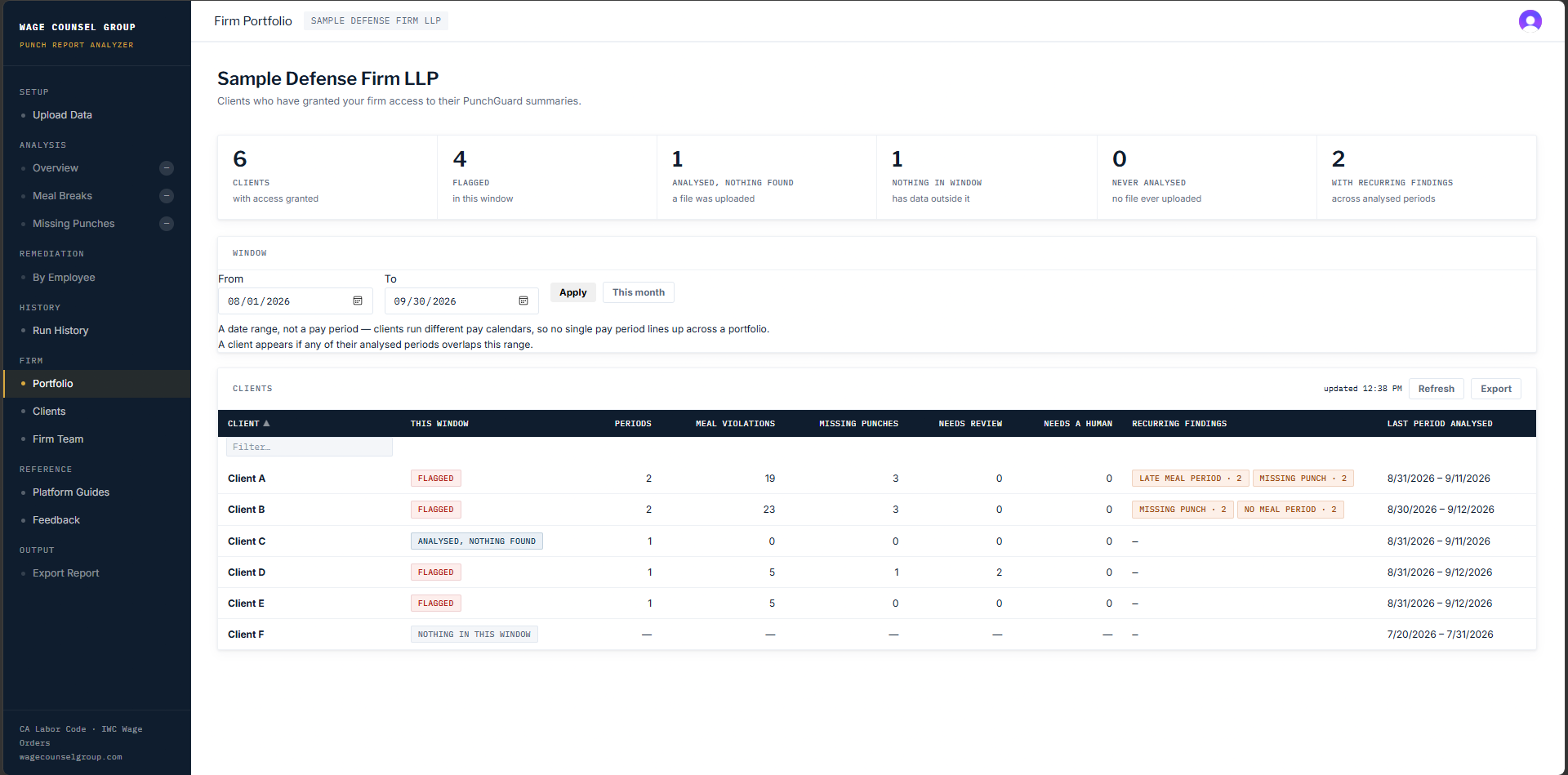
Illustrative sample data. Not client information.
Needs review means a shift that may carry a valid waiver, for the client to confirm. Needs a human means a record the software can't resolve and flags for a manual look.
Bill for the pay-period review your clients already need.
Clients check each payroll
Self-serve and fast. Violations show up while the pay period is still open.
You review and advise
Premiums, scheduling and coverage fixes, and manager training.
You bill for your time
A recurring compliance service, not a one-off audit.
PunchGuard finds the violations. Your clients still need counsel to decide what to do about them.
"Catching meal break violations during quarterly reviews isn't compliance — it's evidence collection."
Won't this create evidence against my client?
It is the first thing defense counsel asks. Here is the straight answer.
- Reports can be discoverable. Opposing counsel can request a PunchGuard report in litigation.
- Reports are not privileged. PunchGuard is software from a company that is not a law firm.
- Ignoring a flag can make nonpayment willful. PunchGuard is for clients who will pay what is owed.
A flag is a prompt to act. Your client can pay the premium in that pay period's payroll, and it appears on the wage statement. If your client wants a review at counsel's direction, your firm can engage WCG for a Forensic Engine analysis. WCG delivers the report to your firm.
One client. One pay period. One report.
Invite one client by email.
Ask them from the Clients page. They click Allow to grant your firm access.
Your client uploads one pay period's export.
Review it in a 15-minute meeting.
Your client receives the full report. Your firm's dashboard shows the account summary only: the period analyzed, violation counts and flagged status. No files, no employee names, no dollar amounts. Your client decides whether the firm gets access.
What PunchGuard detects
No meal period
Shifts over 5 hours with no recorded meal punch.
Short meal period
Meal punches under 30 minutes.
Late meal period
Meal started after the fifth hour.
Missing punches
Incomplete records, flagged for review.
First meal waiver question
Over 5 and up to 6 hours with no meal recorded. Flagged for review, since mutual consent may apply.
Second meal waiver question
Over 10 hours with no second meal recorded. Flagged for review, since a waiver is possible on shifts up to 12 hours.
License PunchGuard across your book.
Flat annual firm license. No percentage of client billings. Each client holds its own PunchGuard subscription ($99/month + $3 per employee) and owns its data. The firm license covers the dashboard across the clients you manage.
Ask about licensingRun one client through PunchGuard.
One export. One pay period. Free.